



Product Information
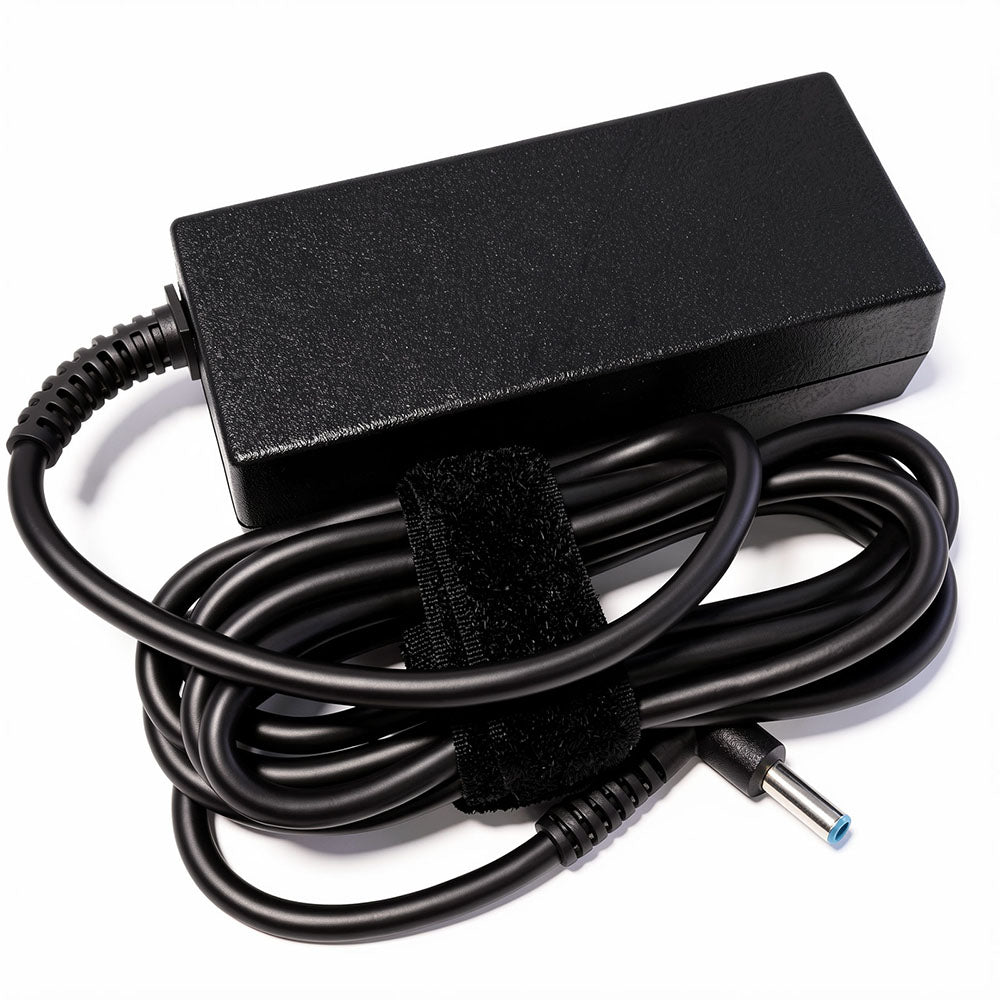
Need a replacement AC adapter for an HP laptop with a 4.5mm blue-tip Smart Pin connector? The HP PPP009C 65W adapter is identified by HP spare part number 710412-001 and is intended for compatible HP laptop configurations requiring 19.5V DC power at up to 3.33A.
Before selecting a replacement, compare the output rating, connector dimensions, Smart Pin design, and part number on your existing adapter. HP laptop families can include different charging configurations, so matching the brand alone is not sufficient to establish compatibility.
Key Includes
- 65W power output: Provides 19.5V DC at up to 3.33A for compatible laptop configurations.
- 4.5mm Blue Tip connector: Uses the HP-style 4.5 × 3.0mm barrel connector with a central Smart Pin.
- Smart Pin identification: Supports adapter identification on compatible HP systems.
- Common model reference: PPP009C, associated with HP spare part number 710412-001.
- Replacement application: Suitable for selected HP laptops that require the matching electrical output and connector configuration.
Product Identification and Electrical Requirements
- Adapter model: PPP009C
- HP spare part number: 710412-001
- Additional reference: 709985-002, listed as a cross-reference for this product; verify against your original adapter label before relying on it.
- Adapter type: AC-to-DC laptop power adapter
- Rated output: 65W
- Output voltage: 19.5V DC
- Output current: 3.33A maximum rated output
- Input voltage: 100–240V AC
- Input frequency: 50–60Hz
- DC connector: 4.5 × 3.0mm Blue Tip HP Smart Pin barrel connector
Use the electrical ratings printed on the physical adapter label as the final reference for the particular unit. Part-number cross-references may vary between product listings and system configurations.
Which HP Laptops May Be Compatible?
This adapter may be suited to selected HP Pavilion and HP ProBook laptops designed for a 65W, 19.5V supply with a 4.5mm Blue Tip Smart Pin connector. Compatibility must be checked against the exact laptop model and its required power input.
Do not assume that every laptop in the Pavilion, ProBook, or Envy family uses the same charger. Different generations and configurations can require different wattages, connectors, or charging interfaces.
This is a barrel-connector adapter, not a USB-C charger. It should not be selected for a laptop that requires USB-C Power Delivery or a different barrel connector simply because the device is also an HP product.
How to Verify Compatibility Before Use
- Read the original adapter label. Confirm that the required output is 19.5V and that the current and wattage requirements are compatible with a 65W supply.
- Inspect the connector. Confirm the 4.5 × 3.0mm Blue Tip design, including the central Smart Pin. Do not confuse it with HP's larger 7.4mm connector.
- Check the part number. Compare the number on the existing adapter with 710412-001 or a verified cross-reference for your laptop configuration.
- Identify the exact laptop. Use the laptop's product number or full model designation rather than relying solely on its Pavilion or ProBook series name.
- Confirm before connecting. If the original output rating, connector, or part number differs, verify compatibility through the laptop manufacturer's documentation before using the replacement.
Understanding the HP Blue Tip Smart Pin
The HP Blue Tip connector combines a barrel-style DC connection with a central identification pin. On compatible systems, the identification function helps the laptop recognize the connected power adapter and its supported power characteristics.
A connector that looks correct from the outside is not necessarily a complete match. An adapter with a different connector size, missing or incompatible identification pin, or unsuitable output rating may fail to charge the battery correctly or may trigger an adapter-recognition warning.
For this reason, connector appearance should be considered alongside voltage, current, wattage, and part-number information when choosing a replacement charger.
Common Charging Problems and Checks
The laptop does not recognize the adapter. Check that the connector is fully inserted and that the tip and central pin are not bent or damaged. A connector that fits physically may still be electrically incompatible.
The battery charges slowly or does not charge. Check the laptop's required wattage and the adapter's output rating. Background workload, battery condition, system settings, and the laptop's charging circuit can also affect charging behavior.
The power connection is intermittent. Inspect the adapter cable, connector tip, and laptop power jack for visible damage or looseness. Stop using the adapter if wiring is exposed or the connector is damaged.
The laptop reports an adapter warning. Check the model and part number again. On systems that use Smart Pin identification, an incompatible or damaged identification connection can prevent correct adapter recognition.
Questions and Answers
1. Is HP PPP009C the same as part number 710412-001?
PPP009C is the adapter model reference associated with 710412-001. HP maintenance documentation identifies 710412-001 as a 65W Smart 4.5mm adapter. Always compare the original adapter label and laptop requirements before choosing a replacement.
2. Is 709985-002 interchangeable with 710412-001?
The two numbers are associated in some product cross-reference listings, but that association alone does not establish universal interchangeability. Check the original adapter's specifications and the laptop's exact product number.
3. Will this adapter work with every HP Pavilion or ProBook?
No. It is intended for selected configurations that require the matching 65W output and 4.5mm Blue Tip Smart Pin connector. The series name alone is not enough to confirm compatibility.
4. Can I use this adapter if my laptop requires 19.5V?
Matching voltage is necessary, but it is not sufficient by itself. The laptop's power requirements, connector dimensions, Smart Pin compatibility, and required wattage must also be checked.
5. Can a higher-wattage adapter replace this 65W adapter?
Not automatically. A higher-wattage adapter may be suitable when the voltage, connector, identification design, and supported electrical characteristics are compatible with the laptop. Check the specific adapter and computer requirements first.
6. Does this charger support USB-C charging?
No. This model uses a 4.5 × 3.0mm Blue Tip barrel connector with a central Smart Pin. It is not a USB-C Power Delivery charger.
7. Why does my HP laptop display an adapter warning?
Possible causes include an incompatible adapter, an incorrect or damaged Smart Pin connection, a damaged power jack, or an adapter that the laptop cannot identify correctly. Check the part number and connector, and have the equipment inspected if the warning persists.
8. What should I check if the laptop still will not charge?
Check the wall outlet, power connections, adapter label, connector condition, and laptop charging requirements. If the adapter matches the documented requirements but the problem continues, the battery, charging port, or internal power circuitry may need diagnosis.
Product Identification Summary
The HP PPP009C is a 65W AC-to-DC laptop adapter associated with HP spare part number 710412-001. Its specified output is 19.5V DC at 3.33A, and it uses a 4.5 × 3.0mm Blue Tip Smart Pin connector. It is intended for compatible HP laptop configurations that require these electrical and connector characteristics. Check the original adapter label and exact laptop model before selecting a replacement.